Baunto
Screenshot your bounty or weekly kill tasks for hunt estimates, plus a shared community hunt database for Tibia Discord servers.
What it does
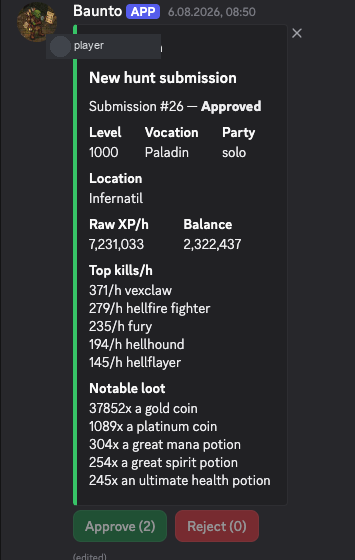
Look up creatures, estimate hunt stats for your level and vocation, and submit hunting-analyser sessions for community review. Approved hunts build a shared database your server can reuse. Submissions can tag hunt events (double respawn, boosted creature, boosted area), and estimates can include how many kills you still need so you see time per spawn.
Attach a screenshot of the Set Up & Reroll Tasks window or the weekly Kill Tasks grid. Baunto reads creature names and remaining kills, then estimates time (or kills per lap when kills/h is not in the database yet). Level and vocation are saved after the first time you send them.
Commands
All commands live under the /bounty group.
/bounty monsters- Search Tibia creatures and related hunt data. Option:
query. /bounty estimate-
Estimate hunt stats for a monster at your level/vocation.
Options:
monster,level,vocation,party_type(Solo / Duo / Trio / 4 voc / 5 voc), optionalkills_needed(shows estimated time per spawn). Level and vocation are remembered for later commands. /bounty tasks-
Attach a screenshot of the daily Set Up & Reroll Tasks window
(the 3 bounty cards). Estimates remaining kills as solo.
Options:
screenshot(PNG, JPEG, or WebP), optionallevelandvocation(saved after the first use). If you attach a weekly Kill Tasks window by mistake, Baunto still reads it as weekly. /bounty weekly-
Attach a screenshot of the weekly Kill Tasks 3×3 window.
Skips Any Creature. Same saved level/vocation as
/bounty tasks. Crop the task window if you can; the whole client is fine as long as the grid is readable. /bounty submit-
Submit a hunting analyser session for community review (opens a form).
Options:
vocation,party_type, optionalevent(defaults to No event; or Double respawn, Boosted creature, Boosted area). After a screenshot estimate you can pick a mapped creature from a dropdown instead of typing the location. /bounty setup- Set the channel where hunt submissions are posted for review (Manage Server). Option:
channel. /bounty setup-show- Show the configured submission review channel.
Quick start
- Invite Baunto and run
/bounty setupin your review channel. - Send your
levelandvocationonce (on estimate or a screenshot command). Baunto remembers them. - Use
/bounty tasksor/bounty weeklywith a screenshot of the task window, or/bounty estimatefor a single creature. - Share real sessions with
/bounty submitso others can learn from them.
Permissions
Baunto does not need Administrator. The default guild install requests:
- View Channels — read the configured review channel.
- Send Messages — post estimates, replies, and submission prompts.
- Embed Links — format hunt information cleanly.
- Add Reactions — support review voting and interaction flows.
- Read Message History — inspect and update earlier review messages.
Slash commands are installed through the applications.commands scope.
If the invite screen asks for Administrator, stop and review the install settings.